Holiday reminders by text, on your terms.
Text Alerts
Last updated · March 2026
What the program is
Logo365 Text Alerts are reminders sent shortly before holidays on your own Logo365 calendar, so you know a new holiday edition of your logo is ready to use.
Alerts are available to Pro and Ultra subscribers, and only to customers who turn them on themselves. We never send texts to anyone who has not opted in through their account.
How you opt in
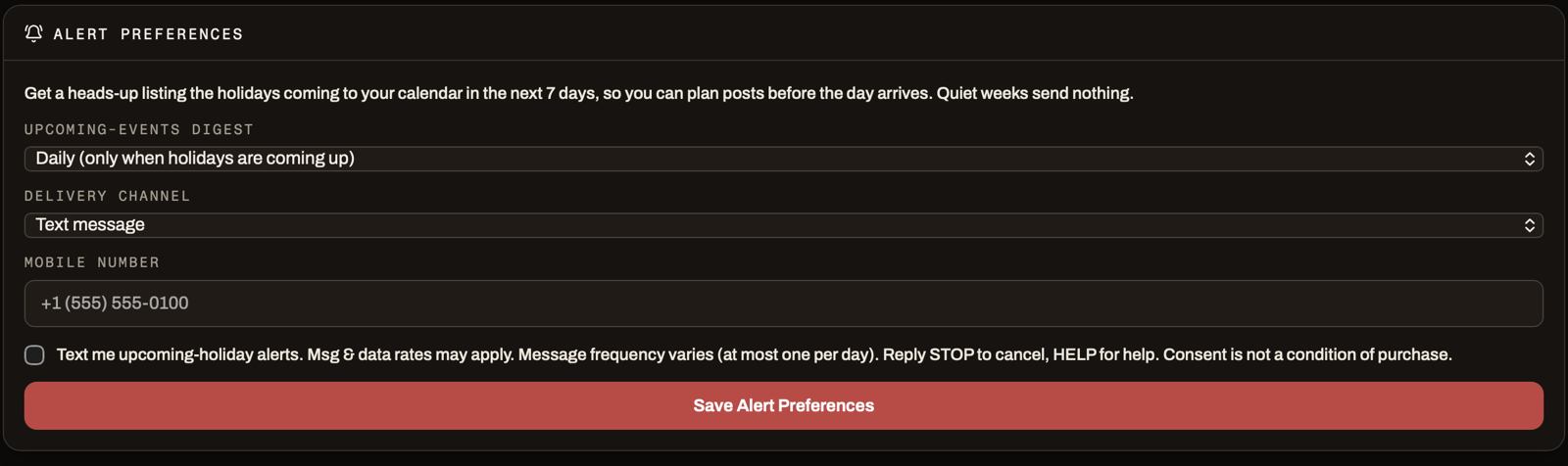
Sign in to the Logo365 portal and open Settings, then Alert Preferences. Choose "Text message" or "Email + text" as the alert channel, enter your mobile number, and tick the consent box. The box is unticked by default and reads:
"Text me upcoming-holiday alerts. Msg & data rates may apply. Message frequency varies (at most one per day). Reply STOP to cancel, HELP for help. Consent is not a condition of purchase."
Texts cannot be enabled without ticking the box, and agreeing to texts is never a condition of buying or keeping a subscription. The date and time of your consent are stored with your account.
How often you hear from us
At most one message per day, and only when a holiday on your calendar is approaching. Most customers receive a few messages per month. Message and data rates may apply.
You can also choose a weekly roundup instead of daily reminders, or switch alerts to email only, at any time in Alert Preferences.
What a message looks like
Right after you opt in: "Logo365: You're signed up for upcoming-holiday text alerts, at most one per day. Msg & data rates may apply. Reply STOP to cancel, HELP for help."
Before a holiday: "Logo365: coming up on your calendar — Halloween (Oct 31). Your logo editions: logo365.ai/portal/calendar — Reply STOP to opt out."
How to stop, restart, or get help
Reply STOP to any message and you are unsubscribed at once; you receive one confirmation and nothing further. Reply START to subscribe again. Reply HELP for a short message with our contact details.
You can also turn texts off in Settings, Alert Preferences, or email support@logo365.ai and we will do it for you.
Your number and your privacy
Your mobile number is used only to deliver the alerts you asked for. It is never shared with or sold to third parties. When you reply STOP or turn texts off, your number and consent record are removed.
Carriers are not liable for delayed or undelivered messages. Full details are in our Privacy Policy and Terms of Service, linked in the footer.